Alternative: Lineuparr
Repository: Dispatcharr-Lineuparr-Plugin 

Goal
Mirror a real TV provider's channel lineup in one operation: create channel groups, create channels with the provider's own channel numbering, match streams from your M3U sources, assign EPG, and assign logos. If you would rather not work through the step-by-step workflow in this guide, Lineuparr is the one-shot alternative.
Not sure whether you want this or the step-by-step workflow? See Which plugins do I need?.
Full Sync DELETES channels it could not match
This is the surprise that catches people. In a Lineuparr-managed group, any channel that ends the run with no streams attached is deleted. So a lineup channel your M3U cannot supply is not left empty for you to fill in later. It is removed.
Both Full Sync and Apply Stream Match Only do this.
To keep them, set Preserve Existing Streams to true. That switches Lineuparr into append mode and turns the unmatched-channel cleanup off.
Back up the Dispatcharr database before your first run.
Full Sync is not atomic
It runs as five sequential steps (groups, channels, streams, EPG, logos). If it fails or is cancelled halfway, you are left with partial state, not a clean rollback. This is the real reason to take a backup first.
Plugin Flow
flowchart TD
    A["Pick Lineup File<br/>e.g. DIRECTV Premier"] --> B["Set M3U Source and<br/>Channel Profile"]
    B --> C["Validate Settings"]
    C --> D["Preview Stream Match<br/>CSV preview"]
    D --> E{"Review CSV"}
    E -->|adjust| F["Tune Match Sensitivity<br/>or Custom Aliases"]
    F --> D
    E -->|looks good| G["Full Sync<br/>groups, channels, streams, EPG, logos"]
    G --> H["Re-sort Streams by Quality"]
    H --> Z(["Mirrored provider lineup"])
Supported Lineups
Twenty lineups ship with the plugin, five more than when this page was first written. Any extra *_lineup.json file you drop in is picked up automatically.
| Lineup file | Package | Country | Channels |
|---|---|---|---|
US_DirecTV-Premier_lineup.json |
DIRECTV Premier | US | 351 |
US_DISH-Top250_lineup.json |
DISH America's Top 250 | US | 215 |
US_Verizon-FIOS_lineup.json |
Verizon The Most Fios TV | US | 202 |
US_Verizon-FIOS-All-11743_lineup.json |
Verizon Fios, all channels (ZIP 11743) | US | 508 |
US_Optimum_lineup.json |
Optimum | US | 342 |
US_Spectrum-Tampa-Bay-All_lineup.json |
Spectrum Tampa Bay, all | US | 409 |
US_Spectrum-Tampa-Bay-No-Spanish_lineup.json |
Spectrum Tampa Bay, no Spanish | US | 322 |
US_Spectrum-Tampa-Bay-Spanish-Only_lineup.json |
Spectrum Tampa Bay, Spanish only | US | 87 |
US_Combined_lineup.json |
US Combined (DIRECTV + DISH + FiOS) | US | 463 |
UK_SkyTV_ENG_full_lineup.json |
Sky TV UK (England) Full | UK | 316 |
UK_SkyTV_ENG_simple_lineup.json |
Sky TV UK (England) Simple | UK | 297 |
UK_SkyTV_lineup.json |
Sky Ultimate TV | UK | 173 |
UK_Freeview_lineup.json |
Freeview UK | UK | 161 |
UK_Combined_lineup.json |
UK Combined | UK | 397 |
FR_CanalPlus_lineup.json |
Canal+ France | FR | 275 |
FR_CanalPlus_TNT_lineup.json |
Canal+ France (TNT numbering) | FR | 275 |
ES_Movistar_lineup.json |
Movistar+ | ES | 171 |
AU_Foxtel_lineup.json |
Foxtel Platinum Plus | AU | 139 |
CA_Telus-Optik_lineup.json |
TELUS Optik TV Ultimate | CA | 128 |
NL_ODIDO_lineup.json |
ODIDO | NL | 153 |
Configuration Options
- Lineup File: Default
US_DirecTV-Premier_lineup.json. Pick the file for the provider you want to mirror. - M3U Source: The M3U source whose streams are matched against the lineup's channels.
- Channel Profile: Default
_none. This does not decide where channels are created: they are always created in the Lineuparr groups. It only decides which profile the matched channels are enabled in afterwards. - Channel Group Prefix: Blank does not mean "no prefix": blank auto-derives one from the lineup name. To suppress it entirely, type the literal word
none. Include your own trailing separator to control the format (for exampleUSorDTV-). - Category Detail: Default
Normal. How granular the auto-created groups are. - Match Sensitivity: Default
Normal. Relax it if streams are not matching; tighten it to reduce false positives. On a multi-country M3U, use Strict. - Channel Numbering: Default
Use Channel Database Numbers: the provider's real channel numbers. - Starting Channel Number: Only applies in Use Specific Number mode. It is ignored in the other numbering modes.
- Order Matched Streams by Quality: Default true. Sorts alternate streams by resolution and FPS.
- Preserve Existing Streams: Default false. Set it to true to append rather than replace, and to stop unmatched channels being deleted. The most safety-relevant setting on this page.
- Quality-Aware Stream Matching: Default false. Keeps e.g.
TF1andTF1 UHDin their own quality tiers instead of matching across them. - Refresh EPG After Match: Default true. Triggers a Dispatcharr EPG refresh once EPG matching finishes.
- Single Channel Match: Scope Preview, Apply Stream Match, Apply EPG and Assign Logos to one channel by name. Full Sync ignores it.
- Rate Limiting: Default
None. Raise it if Dispatcharr returns errors during long runs. The options now name what each one costs you:Lowpauses 0.1 seconds per channel,Medium0.5 seconds,High2 seconds. - Delete CSV Exports Older Than (Days): Default 0, which keeps everything. It removes this plugin's own previews after each new export, leaving other plugins' files alone.
- Custom Channel Aliases (JSON): Manual overrides for channels whose stream name does not match. Define the override once and Full Sync respects it on every run.
- EPG Sources for Matching: A free-text field, not a dropdown. Blank = every source. Otherwise a comma-separated list supporting
*/?wildcards (for exampleUK*), where sources listed earlier win.
Matching reads the stream name only, never its group
A common misconception. Putting a stream in the right group does not help it match. Only the stream's name is compared. On a multi-country M3U this is why a Spanish channel can match a UK one; use Strict sensitivity and lineup-appropriate M3U sources.
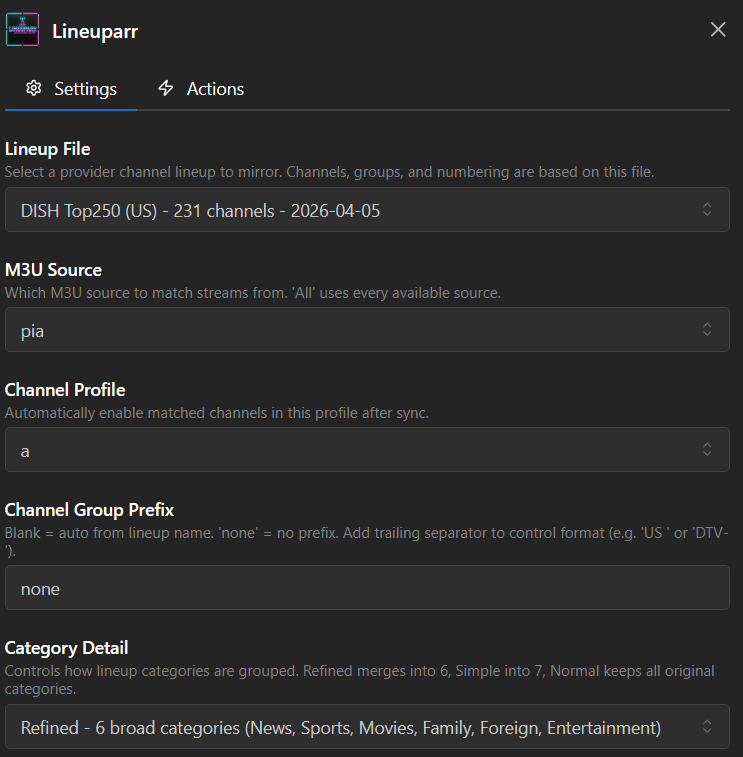
Action Sequence
- Pick a Lineup File, M3U Source, and Channel Profile.
- Run Validate Settings to confirm the lineup file loads, the M3U source is reachable, and the profile exists.
- Run Preview Stream Match to see how your streams match the lineup's channels. Review the CSV. Nothing is written.
- Decide about Preserve Existing Streams before step 5. See the danger note at the top.
- Run Full Sync to create groups and channels, assign streams, EPG and logos in one pass.
- Or run the partial actions instead, for finer control:
- Sync Channels Only: create groups and channels, touching no streams, EPG or logos.
- Apply Stream Match Only: match streams to existing channels. Also deletes unmatched channels.
- Apply EPG Match: assign EPG only.
- Assign Logos: apply logos only.
- Run Re-sort Streams by Quality to re-rank the alternates on each channel.
- Use Show Status to check on a running job or see the last result, and Clear CSV Exports to clean up old previews.
- ✉️ Email Report hands the newest report to the separate Newsflasharr plugin for delivery. It sends the report already on disk rather than re-running a match, so run it after a job has finished. It does nothing unless Newsflasharr is installed and routing this plugin's reports to email.
Important Notes
- Requires Dispatcharr v0.20.0+ and at least one M3U source.
- Lineuparr is an alternative to the main workflow, not a replacement for the individual plugins. You can run Lineuparr first and still use the per-plugin steps for fine-tuning afterwards, such as Stream-Mapparr's quality re-ranking or EPG-Janitor's heal pass. See Which plugins do I need? for how they overlap.
- Custom Channel Aliases is the escape hatch when matching fails for a specific channel.