4. EPG Maintenance: EPG-Janitor
Repository: Dispatcharr-EPG-Janitor-Plugin 

Goal
Find channels that have an EPG source assigned but no actual program data (the "No Program Information Available" state in your TV guide), and either assign new EPG sources (Auto-Match) or replace broken assignments with working alternatives (Scan & Heal).
This is EPG data-quality cleanup, not database size optimization.
Back up your database first
Bulk EPG assignment and removal cannot be undone. Back up the Dispatcharr database before running any destructive actions.
How a match is scored
A channel is matched to an EPG entry by whichever of two methods scores higher:
- Structural scoring: callsign 50 points, state 30, city 20, network 10. Two catches worth knowing: city only scores if the state already matched, and network only counts as a tie-breaker, never on its own.
- Name matching: the same fuzzy name engine the other plugins use, including your aliases, scoring 85 to 100.
The higher of the two wins, capped at 100.
Why the default threshold rejects callsign-only matches
With the default threshold of 95, a channel that matches on callsign alone scores 50 and is rejected. Getting there on structure alone effectively needs callsign + state + city. Most successful matches come from the name side. If almost nothing is matching, this is usually why, and Custom Channel Aliases is the fix.
Plugin Flow
flowchart TD
    A["Save settings<br/>Filter EPG sources"] --> B["Validate Settings"]
    B --> C["Preview Auto-Match"]
    C --> D{"Confidence above<br/>Auto-Match Threshold?"}
    D -->|yes| E["Apply Auto-Match"]
    D -->|no| F["Manual review or<br/>Custom Channel Aliases"]
    E --> G["Scan Missing"]
    F --> G
    G --> H["Heal Preview"]
    H --> I{"Confidence above<br/>Heal Threshold?"}
    I -->|yes| J["Apply Heal"]
    I -->|no| K["Manual cleanup:<br/>Suffix / Remove EPG"]
    J --> Z(["Working EPG across lineup"])
    K --> Z
Configuration Options
- Channel Profile Names: Comma-separated.
-
EPG Sources to Match: A name filter, not a priority list. It supports
*and?wildcards (for exampleUK*). Priority comes from Dispatcharr's own EPG source priority, not from the order you type here.Leave it empty at your peril
Empty means every active EPG source is eligible, including sources for other countries. On a multi-region install that is a reliable way to get wrong matches. Scope it.
-
Hours to Check Ahead: Default 12. There is no enforced range.
- Channel Groups and Ignore Groups: these are not mutually exclusive. Both can be set, Ignore Groups is applied after Channel Groups, and both support
*/?wildcards. - EPG Name REGEX to Remove, Bad EPG Suffix (default
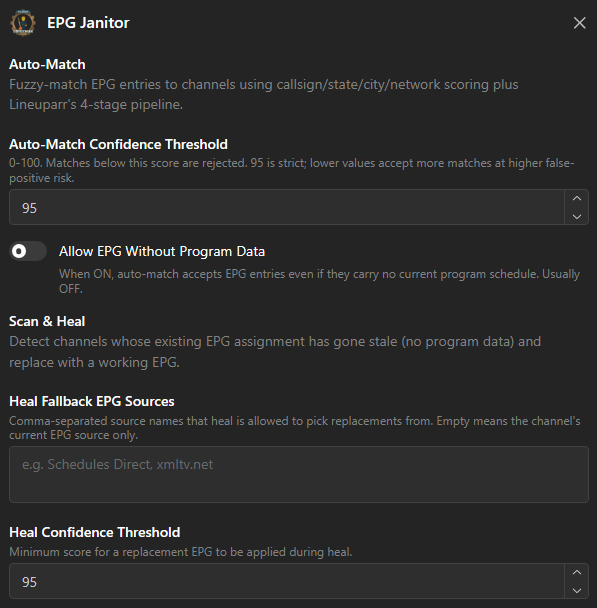
" [BadEPG]"with a leading space), Also Remove EPG When Adding Suffix. - Auto-Match Confidence Threshold (default 95): minimum score before Auto-Match assigns automatically.
- Heal Fallback EPG Sources: if set, this replaces the main source list for the heal pass. It is an override, not an additional last resort. Leave it empty and heal reuses EPG Sources to Match.
- Heal Confidence Threshold (default 95): minimum score before Scan & Heal swaps in a replacement.
- Allow EPG Without Program Data: Boolean, default false. See below.
- Custom Channel Aliases (JSON): Manual overrides for channels whose name matches no EPG entry. This is your main tool when a channel refuses to match.
- Fuzzy matching toggles: Ignore Quality Tags, Regional Tags, Geographic Prefixes, Miscellaneous Tags (all on by default).
- Delete CSV Exports Older Than (Days): Default 0, which keeps everything. It runs after each export and only removes this plugin's own
epg_janitor_*.csvfiles, because the export directory is shared with the other plugins.
EPG Freshness Watchdog
A background job that watches your EPG sources rather than your channels. It never edits channels and never changes an EPG assignment. On each run it looks at every active EPG source and re-triggers Dispatcharr's own refresh for any source that has errored, or whose guide is about to run out of programmes. It is off by default.
The five settings were renamed in 1.26.2481223. If you are following an older copy of this guide, the Watchdog: prefix is gone from each of them.
- Enable Scheduled Watchdog: Default false. Turning it on is not enough on its own, see the warning below.
- Check Interval (Hours): Default 6. How often the check runs.
- Refresh When Guide Ends Within (Hours): Default 12. If a source's newest programme ends within this many hours, the source is refreshed now rather than waiting for it to run dry.
- Excluded EPG Source IDs: Comma-separated EPGSource IDs the watchdog must never touch, for example
39, 21. Use this for a source you refresh by hand or one with a strict provider rate limit. - Log a System Event On Self-Heal: Default true. Writes a System Event when the watchdog successfully refreshes a source. Failures are always logged whatever this is set to.
Enabling the setting does not arm the schedule. Run Validate Settings.
The scheduled job is created when you run ✅ Validate Settings, not when you tick the checkbox and save. Enable the watchdog, set your interval, then run Validate Settings once. Changing the interval later also needs another Validate Settings run before it takes effect.
Silence is the expected result
The watchdog only writes a System Event when it actually refreshes something, or when a refresh fails. If all your EPG sources are healthy it does nothing and logs nothing. An empty System Events list is the normal healthy state, not evidence that the job is broken.
To check a source immediately without waiting for the interval, run 🐕 Run Watchdog. It performs exactly the same check straight away and reports what it did.
Auto-Match matched nothing against a brand-new EPG source? Turn Allow EPG Without Program Data ON, just once.
Dispatcharr only imports program data for EPG entries that are already mapped to a channel. So a freshly added EPG source starts with zero programs, every candidate gets rejected for having no program data, and Auto-Match appears to do nothing.
The sequence is: turn this setting on, run Auto-Match to assign the EPG IDs, refresh the EPG source so Dispatcharr backfills the program data, then turn it back off. Leaving it on permanently is what re-introduces "No Program Information Available".
Action Sequence
- Save settings and run ✅ Validate Settings to confirm profile names, group names, and EPG source names.
- Run 👁️ Preview Auto-Match to see what EPG would be assigned, with confidence scores. Review the CSV.
- Run 🎯 Apply Auto-Match to assign EPG sources at or above the Auto-Match threshold.
- Run 🔍 Scan Missing to find channels still showing "No Program Information Available".
- Run 🧹 Heal Preview to preview replacements for broken EPG.
- Run 🧹 Apply Heal to swap broken EPG for working alternatives at or above the Heal threshold.
- Use 🏷️ Suffix Bad EPG, ❌ Remove Bad EPG, ❌ Remove by REGEX, or ❌ Remove All in Groups for manual cleanup.
- Use 📊 Status / Results, 📄 Export CSV, or 🗑️ Clear Exports to manage output.
- Optionally enable the EPG Freshness Watchdog and run ✅ Validate Settings again to arm it, or run 🐕 Run Watchdog for a one-off check of your EPG sources.
🙈 Strip Hidden EPG deletes program data, and 'hidden' is not what you think
Two separate traps in one button.
It deletes program data, not just the assignment. For every channel it touches it deletes all program rows belonging to that EPG entry. If a visible channel is mapped to the same EPG entry, that channel's guide goes blank too, until your next EPG refresh.
"Hidden" means disabled in any one of the profiles you listed, not "hidden everywhere". A channel that is enabled in profile A but disabled in profile B is treated as hidden and stripped. If you list several profiles, this will bite you. List one.
Important Notes
- Auto-Match vs. Scan & Heal: Auto-Match is for initial setup and bulk assignment. Scan & Heal is for repairing EPG that used to work and broke. Run Auto-Match first, then re-run Scan & Heal periodically.
- The only thing this plugin can schedule is the EPG Freshness Watchdog. Everything else, including Auto-Match and Scan & Heal, is triggered by hand. Earlier versions of this guide suggested scheduling periodic Scan & Heal runs: you still cannot, and the watchdog is not a substitute, because it refreshes EPG sources and never touches a channel's EPG assignment.
- Scan & Heal CSV status codes:
HEALED: a replacement was applied.SKIPPED_LOW_CONFIDENCE: a replacement was found but scored below the Heal threshold, so nothing was changed.REPLACEMENT_PREVIEW: dry-run only: this is what would be applied.NO_REPLACEMENT_FOUND: no working alternative in your configured sources.
- EPG removal and renaming are permanent. All destructive actions require confirmation.