3. Stream Association: Stream-Mapparr
Repository: Stream-Mapparr 

Goal
Match streams to channels by name, attach the best stream to each channel, and rank the alternates behind it so failover has good backups to fall through to. US over-the-air channels are matched by their FCC callsign. The plugin can also toggle channel visibility based on whether a channel ended up with any streams.
Match & Assign REPLACES a channel's stream list. Read this before your first run.
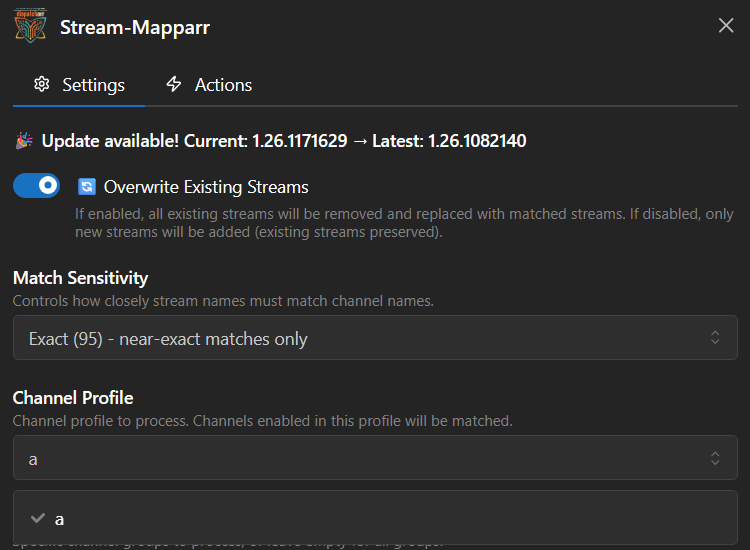
With Overwrite Existing Streams on (the default), Match & Assign does not add to a channel's streams. For every channel it matches, it deletes all existing stream assignments and rebuilds the list from only the streams it matched in this run.
The streams it matched are limited by your current M3U Sources, Stream Groups and Channel Groups selection. So if you narrow M3U Sources to one provider and run it, every stream on those channels that came from your other providers is deleted and not put back. Your failover backups go with it.
- Only narrow M3U Sources if you actually intend to drop the other providers' streams from those channels.
- Set Overwrite Existing Streams to
falseto append instead of replace. - A channel whose group matched zero streams is left untouched, so an over-tight filter blanks nothing. It just quietly does nothing.
- 📡 Match US OTA Only replaces stream lists in exactly the same way.
Back up the Dispatcharr database before your first apply.
Plugin Flow
flowchart TD
    A["Save settings<br/>Profile must NOT be All"] --> B["Validate Settings"]
    B --> D{"Dry Run Mode"}
    D -->|enabled| E["Match and Assign Streams<br/>writes a CSV, changes nothing"]
    E --> F{"Review the CSV<br/>recommendations are in the header"}
    F -->|adjust| G["Tune Match Sensitivity<br/>or Ignore Tags"]
    G --> E
    F -->|looks good| H["Disable Dry Run Mode"]
    H --> I["Match and Assign Streams<br/>applies for real"]
    I --> J["Sort Alternate Streams"]
    J --> L["Manage Channel Visibility"]
    L --> Z(["Channels with ranked streams"])
There is no 'Load / Process Channels' button any more
Earlier versions of this guide told you to run it first. It is gone from the UI. Match & Assign (and its dry run) load and process the channels themselves, so just run Match & Assign.
Configuration Options
Scope: what is eligible to match
- Profile Name: Required. Must be a Channel Profile other than "All".
- Channel Groups: Comma-separated; empty = all.
- Stream Groups and M3U Sources constrain which streams are eligible. The order of M3U Sources matters: streams from sources listed earlier win when ranking. Read the danger note above before narrowing either field.
- Channel Database: Default
US. Supplies the channel list and the OTA callsign rules. - Restrict Matching To Same Country: Only match streams whose detected country matches the channel database. Useful on multi-country M3Us.
Matching
- Match Sensitivity:
Relaxed (70)/Normal (80)(default) /Strict (90)/Exact (95). Use Relaxed if too many channels go unmatched, Strict to cut false positives. (There is no "Loose" option: older versions of this guide called it that.) - Tag Handling: How tags are treated when comparing names (default
Strip All). - Ignore Tags (comma-separated): Extra tags stripped from names before matching.
- Custom Aliases: A JSON object of extra
"Channel": ["Alias", …]mappings, merged with the built-in alias table. An exact alias hit is force-matched. This is the escape hatch when a channel simply will not match by name. - Overwrite Existing Streams: Default true. True means replace, not add: see the danger note.
- Visible Channel Limit: How many duplicate channels to enable per group (default 1).
- Filter Dead Streams: Skip streams IPTV Checker flagged as dead (0x0 resolution). Off by default, so turn it on if you want it.
Matching event slots by what is airing on them
Some providers name pay-per-view and event slots generically, such as PPV EVENT 04, on both the channel and the raw stream, and put the real event title only in the EPG programme data. Nothing in a name-matching pass can join those up. EPG-Aware Placeholder Matching handles that case by matching such a slot on its currently airing EPG programme title instead of its literal name, so a channel you named for a specific event can pick up a generically named incoming stream while that event is the one on air.
It is off by default, and it changes matching only. Channel and stream names are never rewritten.
- Enable EPG-Based Placeholder Matching: The master switch.
- Placeholder Name Patterns (one regex per line): The gate. A name is treated as a placeholder only if it matches one of these, so an ordinary channel name is matched exactly as it is today. This is the setting the scan below exists to help you fill in.
- EPG Title Cleanup Rules (JSON): Applied to the raw programme title before it is used, in the same
[find, replace]format as the Stream Name Regex Rules. It is what strips a wrapper such asNext Event: X at 6:00AM on Jul 26down toX. - Skip Titles (comma-separated): If the cleaned title is one of these, the slot keeps its literal name for that pass. This is for an idle slot, where the guide carries no useful event signal.
- Channel Schedule Suffix Cleanup Rules (JSON): Applied to the channel name rather than the stream. If you name event channels with an inline schedule, such as
WWE Monday Night Raw | Monday @ 5, the default rule strips the trailing annotation so the channel compares asWWE Monday Night Rawagainst the real title instead of losing the match to the extra text. - EPG Event Watch, Source Streams: Exact stream names of real, permanently named channels that carry an event as time-boxed programming without ever getting a placeholder stream of their own.
Finding the patterns you have not written down
🔍 Scan Placeholders, added in 1.26.2491549, reports the numbered stream-name families that your Placeholder Name Patterns do not cover. Before it existed, the setting only ever helped with the naming schemes you had already thought of, and nothing in the interface told apart "this installation has no placeholder families" from "the patterns you wrote match none of them".
The scan replaces the numbers in every stream name with a slot, so MAX 100 and MAX 101 become the one family MAX #, then reports the families no configured pattern covers, each with an anchored regular expression you can paste straight into the setting.
- It reports only. Nothing is ever added to your pattern list, and not every numbered family is a placeholder: a numbered family whose names are already informative matches better as it is.
- Families whose streams carry EPG data are listed first and separately. A placeholder can only be resolved when there is guide data to resolve it from, so this is the part worth acting on. The difference is large in practice: on the installation this was measured against, 131 families were uncovered and only 16 held a stream with an EPG identifier.
- A family needs at least three different numbers in its slot before it counts. Five copies of
HBO 1from five providers are five sources for one name, not five slots. - A digit immediately followed by
Kis left alone, because4Kand8Kare resolution tags rather than slot numbers. - It reads one database column, opens no provider connection, changes no setting and writes nothing to the database. It is safe to run at any time.
- The full readout goes to
/config/stream-mapparr/placeholder-name-scan.txt, because the pop-up notification holds only about 280 characters. The detailed list is capped and says how many entries it left out rather than truncating silently. A scan that runs out of its time budget is reported as partial rather than presented as complete.
Ranking the alternate streams
Sorting decides which stream plays first and which ones failover falls back to. The full order is:
throughput tier → M3U source order (or quality, if Prioritize Quality is on) → audio channels → audio codec → resolution → FPS
- Prioritize Quality: Rank by resolution and FPS ahead of M3U source order.
- Enable Throughput Sorting: Default true. Puts a measured-bandwidth tier ahead of everything else. It only does anything once you have run 🚀 Probe Stream Throughput: with an empty cache every stream is "unknown" and the tier collapses to a no-op.
- Audio Channels Priority / Audio Codec Priority: Ordered lists, best first (for example
5.1, stereo). Ranked before resolution. Empty = off.
Throughput probing
🚀 Probe Stream Throughput opens short connections to the streams currently attached to your channels and measures real delivered bandwidth, so Sort can rank by what actually works rather than by advertised resolution.
- Probe Duration Seconds (8), Probe Cache TTL Minutes (30), Probe Rate Per Minute (6), Bitrate Safety Margin (1.10).
- Probes are serialized per M3U account with a one second gap between them, because providers usually cap concurrent connections.
Probing consumes a provider connection
A probe opens a real connection to your provider. If your provider allows only a small number of concurrent connections, probing while somebody is watching can interrupt their stream. Probe when the house is quiet.
Scheduling and automation
- Scheduled Run Times: Comma-separated,
HHMMonly: for example0400,1600. A value like04:00is silently ignored. Times follow Dispatcharr's global Time Zone (Settings → General). This plugin no longer has a Timezone setting of its own. - Scheduled: Match Streams (default on) and Scheduled: Sort Streams (default off) decide what a scheduled slot actually does.
-
Auto-match after M3U refresh: Opt-in, default off. Runs Match & Assign automatically each time an M3U refresh finishes. Requires Dispatcharr v0.27+ and a Profile to be selected.
This automates the replace-the-stream-list behaviour
With this on, the rebuild described in the danger note runs unattended after every refresh. Only enable it once you are happy with what a manual run produces.
-
Wait For IPTV Checker and IPTV Checker Max Wait Hours (6): a scheduled run can block for hours waiting for IPTV Checker to finish first.
-
Run After IPTV Checker Scan: Opt-in, default off, added in
1.26.2561754. When IPTV Checker finishes a scheduled scan that reached the end of its channel list, Stream-Mapparr runs the same steps its schedule runs (Sort Streams and Match Streams, whichever are ticked) straight away, instead of at the next fixed time. IPTV Checker must have its own Trigger Stream-Mapparr After Scheduled Check setting on as well (IPTV Checker1.26.2561754or later). A run already in progress is left alone, and the next scan tries again. The CSV header of such a run readsScheduled (after IPTV Checker scan).Keep a fixed time as well
From
1.26.2571153, when this setting is on and IPTV Checker is still scanning at your fixed time, the fixed-time run steps aside and leaves the day to the scan's trigger. If that triggered run then fails, there is no Sort that day. With no scan running, the fixed time runs as normal, so keeping one costs nothing.- Enable Scheduled CSV Export: Also write a CSV on scheduled runs.
On versions before 1.26.2241602, check that your schedule is actually firing
The scheduler read its run times from a settings file written by the plugin page, and that file could fall out of step with what the plugin had actually saved. When it did, the plugin logged
No scheduled times configuredand simply never ran, while the settings page kept showing your configured times. Nothing errored, so there was no signal that anything was wrong.Version 1.26.2241602 reconciles the file against the saved settings at startup and rewrites it. If you are on an older build, upgrade. Either way, confirm a scheduled run by its side effects, a new CSV export or a fresh entry in 📋 View Last Results, rather than by the times shown on the settings page.
- Rate Limiting: None / Low / Medium / High. Raise it if you see 429 or 5xx errors.
- Delete CSV Exports Older Than (Days): Default 0, which keeps everything. It removes this plugin's own exports from
/data/exports/after each new one is written, and never touches another plugin's files there. - Webhook URL and Fire Webhook On Completion: Discord and Slack URLs are given their native message format automatically.
Action Sequence
- Save settings and select your Channel Profile (not "All").
- Run ✅ Validate Settings.
- Enable Dry Run Mode and run ✅ Match & Assign Streams. Nothing is written; a CSV lands in
/data/exports/showing what it would do. The CSV header carries tuning recommendations, such as setting Match Sensitivity to Relaxed or adding a tag to Ignore Tags. - Review the CSV. Adjust and repeat until it looks right.
- Disable Dry Run Mode and run ✅ Match & Assign Streams to apply.
- Optionally run 🚀 Probe Stream Throughput to measure real bandwidth.
- Run 🔄 Sort Alternate Streams to re-rank the backups on each channel.
- Run 👁️ Manage Channel Visibility to enable or disable channels based on whether they have streams.
Manage Channel Visibility disables everything first
It disables every channel in the profile, then re-enables only those with at least one stream attached. A channel you deliberately keep enabled with no streams will be switched off.
US over-the-air channels are handled automatically. Callsign matching runs inside Match & Assign, so you do not need a separate pass. 📡 Match US OTA Only is there for when you want to redo only the OTA channels; it replaces stream lists exactly as Match & Assign does.
The other buttons
- 📊 View Check Progress: live progress of the run in flight.
- 📋 View Last Results: summary of the last completed run.
- 💾 Update Schedule: save scheduler settings.
- 🗑️ Clear CSV Exports: delete old CSVs from
/data/exports/. - 🧹 Cleanup Orphaned Tasks and 🔓 Clear Operation Lock: recovery if a previous run got stuck.
- 📊 Preview: generates a CSV preview without making changes. Use it when you want a preview without switching Dry Run Mode on and back off again.
- 🧠 Test Rules: shows what your Stream Name Regex Rules would do across all streams, read-only. Check a new rule here before it touches a matching run.
- 🔍 Scan Placeholders: reports the numbered stream-name families your Placeholder Name Patterns do not cover, with a regex to paste for each. Read-only, and described in full above.
- 🌍 Check Countries: compares each stream's group country against the country suffix on its EPG identifier and reports where the two disagree. It reads two database columns, opens no provider connection and changes nothing, so it is safe to run at any time. Useful when a channel keeps matching a foreign feed.
Important Notes
Long runs report in the UI, not just the logs
Short jobs run inline and return their real result. Longer jobs run in the background: the button re-enables immediately, which does not mean the job finished. Watch 📊 View Check Progress, and read 📋 View Last Results when it is done.
- Docker logs still work if you prefer them:
docker logs -f dispatcharr | grep "Stream-Mapparr". Wait for✅ COMPLETEDbefore queuing the next action. - Operations can take 5 to 15 minutes or more on large catalogs.
- The Channel Profile must exist and must not be "All". The plugin refuses to run otherwise.
- Only one long-running action runs at a time. The operation lock expires after 10 minutes by itself, or clear it with 🔓 Clear Operation Lock.
-
East and West feeds are routed automatically. If you have both
Starz EncoreandSTARZ Encore (W), each is given its own zone's feed. A plain or East channel gets East and unmarked streams; a West channel gets West streams only. A stream with no East or West in its name counts as the East feed.From 1.26.2621504, unmarked streams leave your West channels
Earlier versions kept unmarked streams on a West channel, so a West channel could fail over to a feed three hours ahead. After updating, the next Sort Alternate Streams, or a Match & Assign with Overwrite Existing Streams on, removes those unmarked streams from any West channel that also carries a West feed. With Overwrite off, Match & Assign stops adding them but removes nothing. If no West stream matches at all, a West channel that already has streams is left exactly as it is, and one with no streams gets the East feed rather than nothing.
- Common-word callsigns are guarded. A stream called
24/7 KING OF THE HILLwill not be attached to the Seattle NBC stationKING-TVjust because the word "KING" appears. A callsign that is also an ordinary English word (KING, WHO, WOLF, WAVE, WOOD) has to be corroborated by the station's network or city before it counts.
- Common-word callsigns are guarded. A stream called