2. Channel Organization: Channel Mapparr
Repository: Dispatcharr-Channel-Maparr-Plugin 

Note the spelling
The repository is Channel-Maparr with one p, while the plugin displays as Channel Mapparr. If you are searching GitHub or the Dispatcharr plugin listing and coming up empty, that is why.
Goal
Standardize the names of channels that already exist in Dispatcharr using country channel databases, and optionally re-organize them into category groups (News, Sports, Entertainment, and so on).
Twelve country databases ship with the plugin: AU, BR, CA, DE, ES, FR, IN, MX, NL, NO, UK, US.
Renaming is the main job, but two actions do create channels
Everything in the core sequence works on channels already in your lineup. Two optional actions add new ones: Import M3U Streams pulls streams in from an M3U source, and Create Channels From Streams builds one channel per broadcast station from streams that are not attached to anything yet. Earlier versions of this guide said the plugin never creates channels, which was true before Create Channels From Streams was added.
Back up your database first
This plugin makes bulk channel renames and group reassignments that cannot be undone. Back up the Dispatcharr database before running any actions.
Plugin Flow
flowchart TD
    A["Save settings<br/>Pick country databases"] --> B["Validate Settings"]
    B --> C["Load and Process Channels<br/>matches only, writes nothing"]
    C --> D{"Dry Run Mode"}
    D -->|enabled| E["Rename Channels<br/>exports a CSV preview"]
    E --> F{"Review CSV"}
    F -->|too many skipped| G["Set Match Sensitivity<br/>to Relaxed"]
    G --> C
    F -->|looks good| H["Disable Dry Run Mode"]
    H --> I["Rename Channels<br/>applies the names"]
    I --> J["Tag Unknown Channels"]
    J --> K["Apply Default Logo<br/>or Apply Per-Channel Logos"]
    K --> L["Organize by Category"]
    L --> Z(["Standardized lineup"])
Load & Process Channels does not rename anything
This trips people up. Load & Process Channels only matches your channels against the databases and stores the result. Nothing is written to your lineup until you run Rename Channels. Earlier versions of this guide told you to run Load & Process twice, which renames nothing at all.
Configuration Options
- Channel Databases: Comma-separated 2-letter country codes (default
US). - Match Sensitivity:
relaxed/normal(default, threshold 80) /strict/exact. Use relaxed if real channels are being missed, strict or exact to avoid false positives. (There is noloosesetting: earlier versions of this guide called it that.) - Dry Run Mode: See the warning below: it does not cover every action.
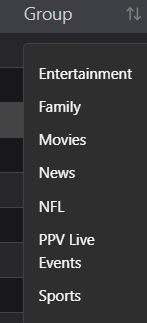
- Channel Groups to Process and Category Organization Groups to limit scope.
- OTA Name Format: Template using
{NETWORK},{STATE},{CITY},{CALLSIGN}(default{NETWORK} - {STATE} {CITY} ({CALLSIGN})). - Ignored Tags: Tags stripped before matching (default
[4K], [FHD], [HD], [SD], [Unknown], [Unk], [Slow], [Dead]). Handles both[]and()forms. - Unknown Channel Suffix: Default
" [Unk]"(with a leading space). - Default Logo: Logo display name from Dispatcharr's Logo Manager, not the filename.
- M3U Source, M3U Group Filter, Category Filter, Custom Import Group Name: used by the Import M3U Streams action.
- Match by Market When No Callsign: Default off. When a channel name gives a market and a channel number but no callsign, such as
ABC 9 HD [SYRACUSE], the station is looked up by market instead. A station is accepted only when exactly one fits, so an ambiguous market is left alone rather than guessed at. Leave it off to match on callsigns only. - Rate Limiting: None / Low / Medium / High. Raise it if Dispatcharr starts returning errors during long runs.
- Delete CSV Exports Older Than (Days): Default 0, which keeps everything. It runs after each export and only removes this plugin's own files from the shared export directory, never the file just written and never the last surviving one.
Creating channels from unattached streams
Create Channels From Streams builds one channel per broadcast station from streams that are not attached to any channel. It is not the same as Import M3U Streams: that one creates a channel per stream, this one creates a channel per station and attaches no streams at all. You attach streams afterwards, usually with Stream-Mapparr.
- Stream Groups to Seed From: Comma-separated stream group names to scan, for example
US| ABC, US| CBS. Only streams in these groups that are attached to nothing are considered. Empty means the action does nothing. - Channel Group to Create In: The existing channel group the new channels land in. The group must already exist, and a group listed in Channel Groups to Ignore is refused.
- First Channel Number to Use: The first number to assign, for example
5110. Numbers already in use are skipped, so you do not need a free block. Leave it empty to start above the highest channel number on the system. - Networks to Skip When Creating Channels: Comma-separated network names, for example
Telemundo, Univision. A station carrying one is reported and skipped rather than created. The network is read both from the station record and from the stream name, because a low power station record often names no network at all.
Email reports through Newsflasharr
These three settings do nothing on their own. They hand a report to the separate Newsflasharr plugin, which is what actually sends mail.
- Send notifications to Newsflasharr: Default off. With Newsflasharr absent or disabled, nothing is sent and nothing fails.
- Email A Report After:
NeverorEvery run that produces an export(default). Organize by Category only reports in Dry Run, because a real run of it produces no export. - Email Report Format:
HTML,CSV, orBoth. A notification carries one attachment, so Both sends two separate emails per run rather than one email with two files. Either way both files are written to/data/channel_mapparr_reports; this setting only decides which get emailed.
The emailed report is not the same file as the CSV export
The emailed report is built specifically for sending and never contains your M3U source names. The CSV exports in /data/exports do contain them, in their settings header. Keep that in mind before forwarding one on.
Dry Run Mode does not protect every action
Dry Run Mode only covers Rename Channels, Organize by Category, Import M3U Streams, and Create Channels From Streams.
These three actions write to your database immediately, even with Dry Run Mode ON, and give you no preview:
- Tag Unknown Channels: bulk-renames every unmatched channel to add the suffix.
- Apply Default Logo
- Apply Per-Channel Logos
Back up before you run any of them for the first time.
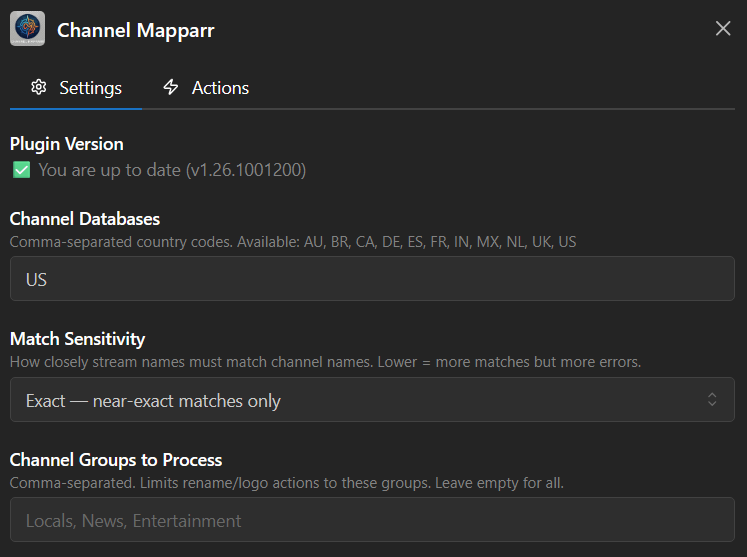
Action Sequence
- Save settings and select the country databases you want loaded.
- Run Validate Settings to confirm configuration.
- Run Load & Process Channels to match your channels against the databases. This writes nothing to your lineup.
- Enable Dry Run Mode and run Rename Channels to export a CSV preview of the proposed names.
- Review the CSV. If too many channels are skipped, set Match Sensitivity to
relaxed, re-run Load & Process, and preview again. - Disable Dry Run Mode and run Rename Channels to apply the standardized names.
- Optionally run Tag Unknown Channels to flag whatever did not match. This writes immediately. Dry Run does not stop it.
- Optionally run Apply Default Logo (a single fallback logo) or Apply Per-Channel Logos (fuzzy-matches each channel against the public tv-logos repository). Both write immediately.
- For category sorting, run Organize by Category, with Dry Run Mode on first to preview, then again with it off to commit.
- Use Import M3U Streams if you need to pull streams from an M3U source, Show Status to check on a run, and Clear CSV Exports to clean up old preview files.
- If you are building a lineup from scratch, run ✚ Create Channels with Dry Run Mode on to preview which stations would be created, then again with it off. Attach streams afterwards with Stream-Mapparr.
- If you use Newsflasharr for mail, 📧 Email Report Now sends a report from the last processed channels. It checks that Newsflasharr is installed, enabled, configured and routed, and refuses rather than queueing a report nobody will receive. Queued means written to Newsflasharr's queue, not that it has reached your inbox.
Important Notes
- Use the display name from the Dispatcharr Logos page for Default Logo, not the filename.
- Always preview with Dry Run Mode before running Rename or Organize for the first time on a profile. They touch many channels at once.
- Over-the-air channels are matched by the callsign found in the existing channel name. A callsign that is also an ordinary English word (KING, WHO, WOLF, WAVE, WOOD) is only accepted with corroboration, so a channel named
24/7 KING OF THE HILLis reported as skipped rather than renamed into a Seattle NBC station. If you expected such a channel to be renamed and it was not, this guard is why.