Prerequisites
These plugins assume Dispatcharr already has channels in your lineup and at least one Channel Profile other than "All" is set up. Channels are typically auto-created during M3U import or built in one pass by the Lineuparr plugin. None of the plugins in this guide create channels from scratch. They organize, validate, map streams to, repair EPG on, or toggle visibility for channels that already exist.
Channel Profile Requirement
The Channel Profile requirement is strict: Stream-Mapparr will refuse to run against the default "All" profile, and Event Channel Managarr requires you to specify a profile name.
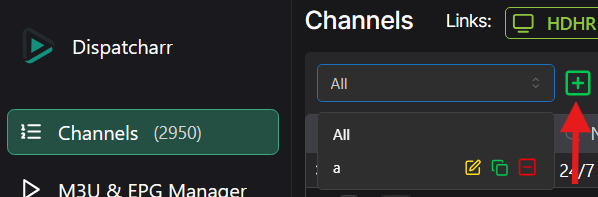
If you have not created one, see the Dispatcharr documentation on Channel Profiles. Open the Channel Profile drop-down on the Channels page and click the icon next to it to create a new profile.
Back Up the Database
Several plugins make bulk changes that cannot be undone, and some of them delete channels, streams or program data outright. Back up the Dispatcharr database before running any of them.
See Backup and recovery for how to take a backup, exactly what each plugin can destroy, and how to restore. The upstream instructions are in the Dispatcharr troubleshooting docs.
API Credentials
Modern Dispatcharr releases give plugins direct database/ORM access, so there is no longer a need to configure a Dispatcharr URL, username, or password in any of these plugins. If your plugin still shows credential fields, update the plugin to its current release.